Vibe Coding Hub 1.0 is out. It is an AI coding agent that comes as a cross-platform desktop app and a command-line tool, built on .NET 10 and released under the MIT license. It works with OpenAI, Anthropic, Ollama and any OpenAI-compatible API, so you can run hosted models or fully local ones. Version 1.0.1 followed right after and brings the first downloadable builds for Windows, Linux and macOS.
What is Vibe Coding Hub?
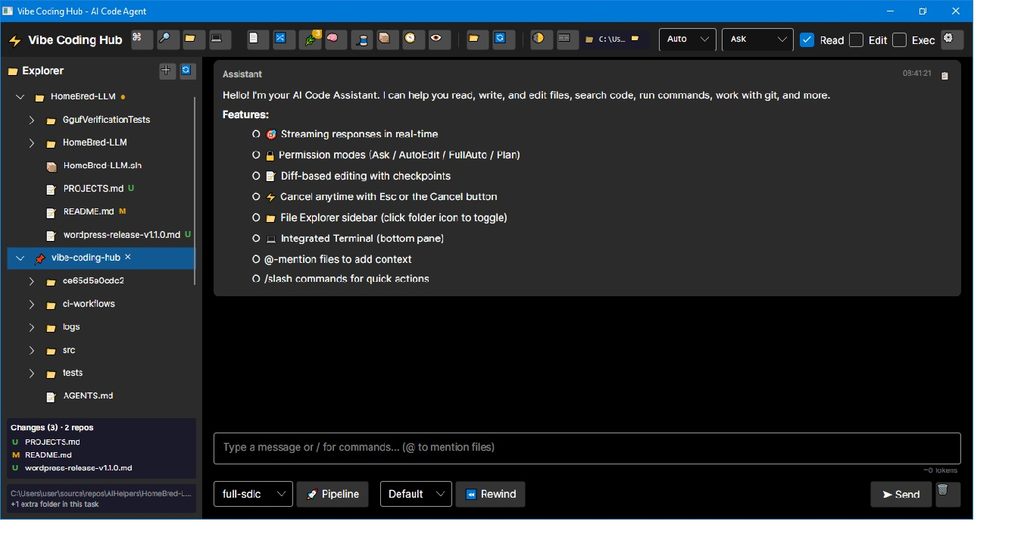
Vibe Coding Hub is a coding agent in the same family of tools as Cursor and Codex. You describe what you want, the agent plans the work, edits files across your project, runs commands and shows you exactly what changed. The difference is that you stay in control of the model: bring your own API key for OpenAI or Anthropic, or point the app at a local model through Ollama or LM Studio.
It ships in two forms that share the same engine: a desktop application for day-to-day work, and a CLI for interactive chat and one-shot prompts in the terminal.
What’s new in v1.0.0
A desktop app built for working with agents
The desktop app is built with Avalonia and runs natively on Windows, Linux and macOS. It brings together a chat panel, a code editor with diffs, file preview and a command palette. A live activity bar shows what the agent is doing right now and how long it has been running, so long tasks never feel like a black box.
Autonomous agents with visible planning
The agent can work across many files on its own, and it shows its plan as it goes. It can delegate pieces of work to subagents, and it has a full toolbox: file operations, directory browsing, grep, command execution, git, web fetching, diagnostics and browser checks.
Multi-agent sessions and parallel work
This is the headline feature. You can run several agents in parallel and let them message each other. Each agent can work in its own Git worktree on its own branch, so parallel tasks do not step on each other’s files. You can also run tasks in parallel across multiple projects.
For repeatable workflows there are SDLC pipelines that chain the stages of a change: analyze, implement, review, test and deploy.
Review changes like a pull request
Reviewing what the agent did should be quick, so the app includes:
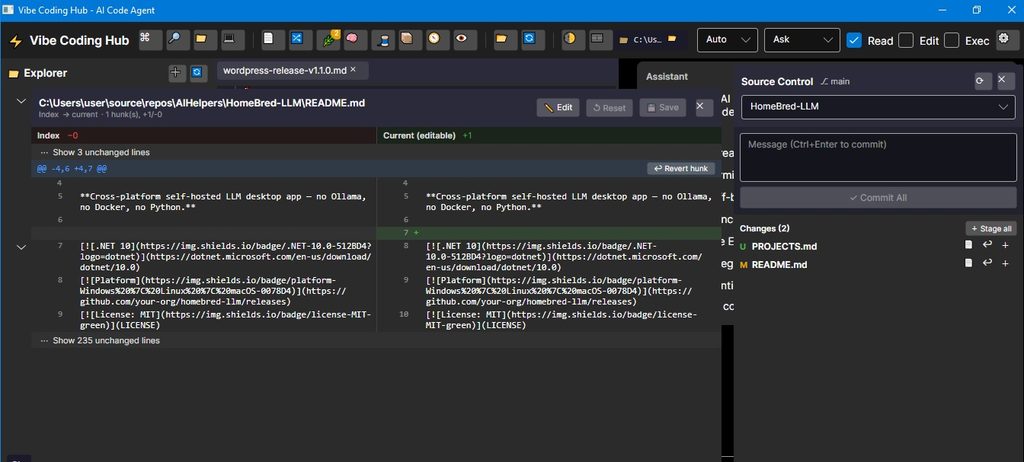
– a GitHub-style side-by-side diff viewer with word-level highlighting;
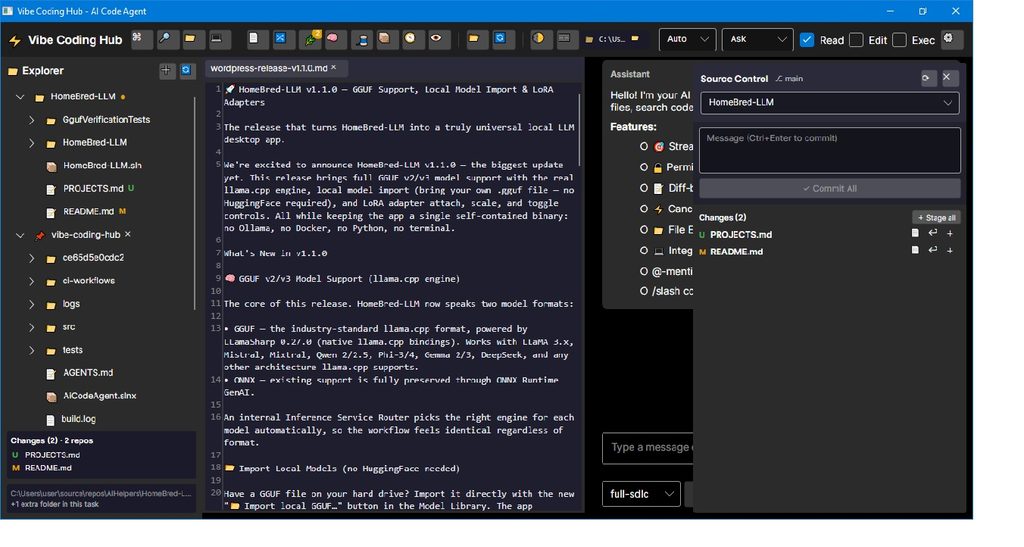
– an auto-updating file Explorer with git status indicators;
– a Source Control panel where you can view changes, stage them and commit.
Code intelligence
Vibe Coding Hub can index your workspace and answer questions about the codebase semantically, so you can ask “where do we handle authentication?” instead of grepping for it. It also uses LSP-based code intelligence, offers predictive autocomplete, and includes a visual editing layer for generated UI.
Safety and control
Letting an agent run commands on your machine requires trust, so the app gives you several layers of protection: permission modes (including read-only access and path restrictions), checkpoints with undo, and optional Docker sandboxing. Cost tracking with spend caps and prompt caching support helps keep API bills predictable.
Context and memory
Sessions are persisted, so you can close the app and resume later. The context window is managed automatically with trimming and compaction, and you can give the agent lasting project knowledge through an AGENTS.md file in your repository.
A CLI for the terminal
Prefer the terminal? The CLI gives you interactive chat and one-shot prompts with streaming responses, using the same agents, tools and providers as the desktop app.
v1.0.1: downloadable builds and CI
Version 1.0.1, published on October 1, is the first release with downloadable builds. The application itself is unchanged from 1.0.0. What changed is the delivery pipeline:
– CI pipeline: every push to main and every pull request is built and tested on Windows, Linux and macOS.
– Release pipeline: pushing a v* tag builds self-contained, single-file binaries and attaches them to the GitHub Release.
Because the binaries are self-contained, you do not need to install .NET to run them.
Download
Each platform has a desktop build and a CLI build, available on the v1.0.1 release page (https://github.com/AIHelpers/vibe-coding-hub/releases/tag/v1.0.1):
– Windows x64 (.zip)
– Linux x64 (.tar.gz)
– macOS Intel (.tar.gz)
– macOS Apple Silicon (.tar.gz)
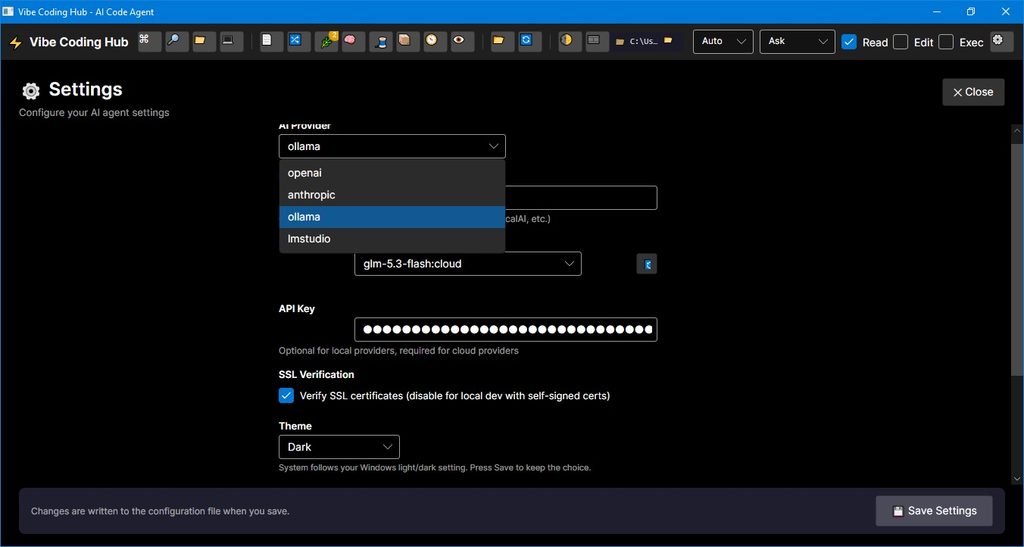
Download the archive for your system, unpack it and launch the app. Then add an API key for your provider, or point the app at a local Ollama or LM Studio server.
Good to know
– Unsigned binaries. The builds are not yet code-signed or notarized, so Windows SmartScreen and macOS Gatekeeper may show a warning on first launch.
– Worktree agents start from HEAD. Agents isolated in a Git worktree work from the last commit, so uncommitted changes are not included.
Try it and tell us what you think
Vibe Coding Hub is open source under the MIT license. Grab the latest build from the releases page (https://github.com/AIHelpers/vibe-coding-hub/releases), browse the code in the GitHub repository (https://github.com/AIHelpers/vibe-coding-hub), and open an issue if you hit a bug or want a feature. Feedback on parallel agents and the SDLC pipelines is especially welcome.
Leave a Reply